DROPKILN / SELF-HOSTED / MIT
Self-hosted AI artifacts, on your domain.
POST HTML, React components, Markdown, or a zipped site and get an unguessable URL on your domain. One container, MIT.
Free and MIT to self-host, forever. Pricing covers the tiers, and managed hosting is on the way.
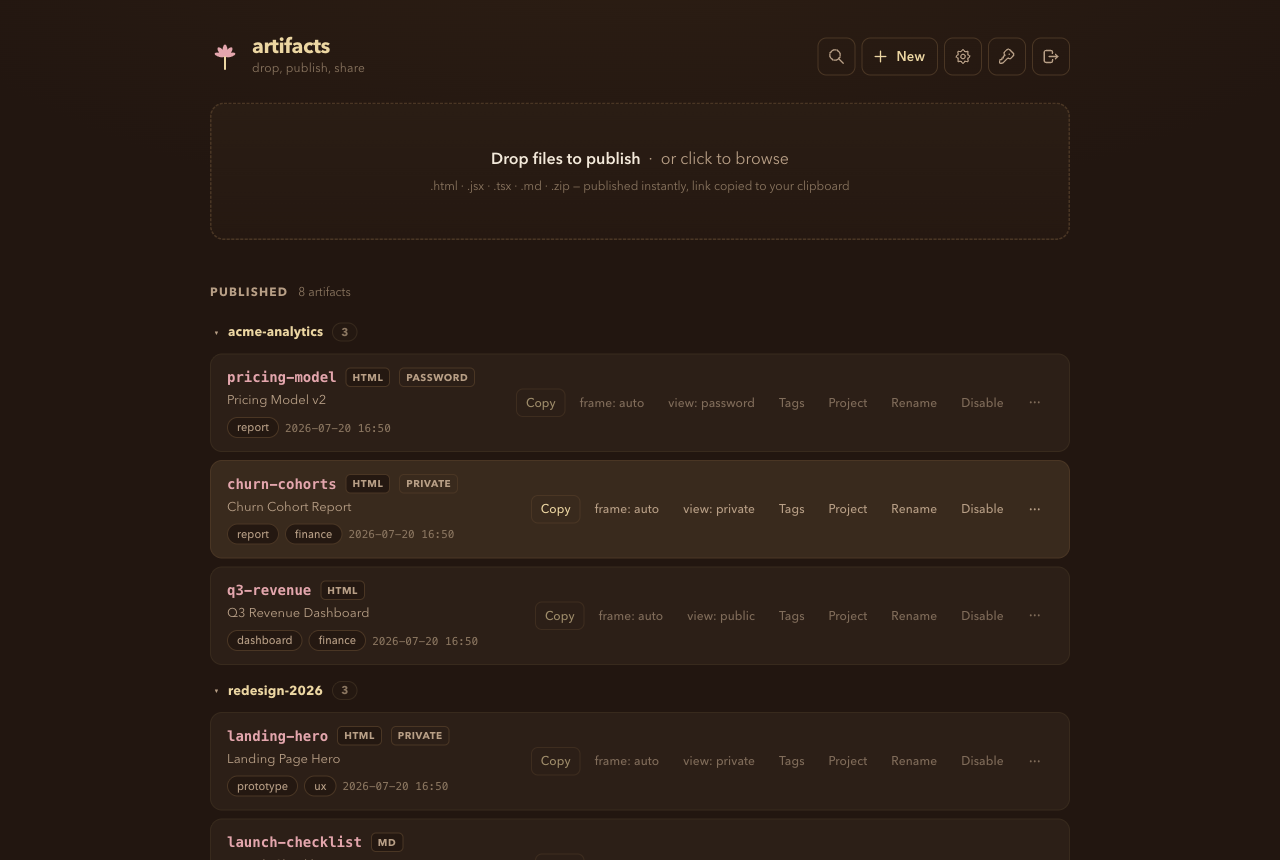
Every row is a live page: copy the link, flip visibility, tag it, group it into a project, or disable it. A hosted demo is coming; until then the screenshot is the real UI.
Your agent publishes it.
The built-in MCP server gives Claude Code, Codex, or any MCP client a
publish_artifact tool. The agent publishes
the page it just wrote and replies with one link, instead of pasting hundreds of lines
back into the chat.
Keys are scoped and revocable, so the one you hand an agent can publish without being able to delete.
Publish the churn report I just built to Dropkiln, and keep it private.
Publishing it now, private visibility.
{ type: "html", slug: "churn-jul", visibility: "private" }
Done. It's live, private so only key holders can open it.
artifacts.example.com/a/churn-jul-a4f9c2Publish directly from your coding agent in a single tool call.
Running in 60 seconds
- 01 Clone, set
ARTIFACTS_API_KEYandBASE_URLin.env, anddocker compose up. - 02 POST an
.html, JSX/TSX, Markdown, or zipped site, using curl, the CLI, or the web UI. - 03 Get back an unguessable URL under
/a/. Public by default, private or password if you want.
$ git clone https://github.com/anvilnine/artifacts && cd artifacts
$ cp .env.example .env # set key + BASE_URL
$ docker compose up -d
$ npx github:anvilnine/artifacts publish page.html --slug hello
https://artifacts.example.com/a/hello
What you get
Four content types
POST an HTML page, a single JSX/TSX React component (no build step), Markdown, or a zipped static site. Each renders at its own URL.
One container, plain files
By default each artifact is a directory of plain files under /data, so backing up that directory backs up everything. Point storage at S3, git, Postgres, or SQLite instead if your host wipes local disk on restart.
$ docker compose up -d
Private by default
Unguessable slugs, noindex everywhere, optional expiry. Each artifact can be public, private, or password-protected. An admin logs in with a password; the CLI and MCP carry scoped keys instead, so there is no shared master secret.
Clean and audit-friendly
Minimal dependencies, straightforward TypeScript, and no complex build pipeline so you can easily review what runs on your own hardware.
Everything the API does, from your terminal.
One file, no dependencies. Run it with npx,
or clone and node cli.js. Type is inferred
from the file extension, and every command is a plain HTTP call you can make with curl
instead.
$ artifacts publish report.html --slug churn-jul --visibility private
https://artifacts.example.com/a/churn-jul
$ artifacts deploy ./launch-site --slug launch
https://artifacts.example.com/a/launch/ (12 files)
Two environment variables and a container.
The deploy guide walks through setup from git clone to your first live URL. The source code is open source and available to review anytime.